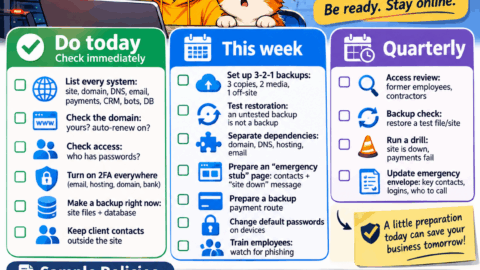
Do immediately / check today
□ List all systems: where the website is, where the domain is, where DNS is, where email is, where payments are, where the CRM is, where bots/apps are, where databases are.
□ Check the domain: is it registered to you or to a contractor? Do you have access to the registrar? Is auto-renewal enabled? This is critical: a domain can be lost even without hackers.
□ Check access: who knows the passwords for the website, hosting, bank, email, ad accounts, CRM. Do former employees still have access?
□ Enable 2FA everywhere possible: email, hosting, domain, bank, CRM, Telegram accounts.
□ Make a backup right now: website files + database. Even if it seems like “everything is working fine.”
□ Check whether you have a copy of client contacts outside the CRM/website: spreadsheet, phone, email. If the website goes down, you must be able to contact clients.
This week
□ Set up backups using the 3-2-1 principle: at least 3 copies, on 2 different media, 1 copy off the main hosting. For example: website on hosting + backup in the cloud + external drive.
□ Test restoration: a backup you have never tested is not a backup.
□ Separate dependencies: domain with one registrar, DNS separately, hosting separately, email separately. Do not keep everything in one account.
□ Prepare an “emergency stub”: a simple page with contacts, a link to Telegram/WhatsApp, a request form, and information saying “the website is temporarily unavailable, we are accepting orders here.”
□ Plan backup payment acceptance: a payment link, manual invoicing, a payment widget, bank details. If the main website goes down, money should not stop.
□ Change default passwords on cameras, refrigerators, smart ovens, alarm systems, and any internet-connected equipment.
□ Train employees: do not open attachments like “reconciliation act,” “tax inspection,” “test assignment” without verification; do not keep passwords on sticky notes; report incidents immediately.
Once a quarter
□ Access review: departed employees, contractors, old services.
□ Backup check: restore one test file/website.
□ Drills according to the regulations: “website down,” “payments not going through,” “employee opened a phishing email.”
□ Update the emergency envelope: list of critical services, logins, who is responsible, where to call.
2. Examples of regulations for small business
Regulation No. 1. Backup
Goal: if the website/server/hosting goes down, the business recovers in hours, not weeks.
What we copy: website files, databases, CRM, accounting, documents, client contacts.
How often: website and databases — daily; important documents — when changed; full archive — once a week.
Where we store: main cloud + independent cloud/external drive physically stored separately.
Who is responsible: Name/Role.
Check: once a month restore one file/page.
Rule: “don’t put all your eggs in one basket” — do not store the backup only with the same hosting provider.
Regulation No. 2. Passwords and access
Each service — a separate long password.
Passwords are stored in a password manager or in a physical notebook in a safe. Not in messages, not in a shared file, not on a sticky note.
2FA is mandatory for email, domain, hosting, bank, CRM.
Access is granted only to those who need it.
Upon dismissal — revoke access the same day.
The emergency set of access credentials is kept by the owner/director in a separate envelope.
Regulation No. 3. Emergency plan “website/hosting down”
0–30 minutes:
Confirm the problem: website, panel, email, payments.
Do not delete or reinstall anything in the panel.
Write to clients on Telegram/social media: “the website is temporarily unavailable, we are accepting requests here.”
Enable backup order/payment acceptance.
30 minutes — 2 hours:
Check the status with the provider.
Put up the “emergency stub” on another hosting/subdomain.
Check whether there is a fresh backup.
Assign a person responsible for client communication.
2–24 hours:
Restore the website from backup or rebuild it from the web archive/saved materials.
If necessary, move the domain/website to another hosting.
Record losses: screenshots, downtime, correspondence.
Regulation No. 4. Payments during a failure
Always have a backup payment link.
Be able to issue an invoice manually.
The list of active clients/orders must be accessible outside the website.
Assign an employee who, on the day of the failure, calls/writes to clients and explains how to pay.
Record all manual payments so that orders are not lost later.
Regulation No. 5. Phishing and an employee incident
Do not open attachments from unknown/suspicious senders.
A “test assignment” that involves installing software — only after verification by IT/management.
If suspected: disconnect the device from the network, notify the responsible person, change passwords, enable 2FA.
Introduce a rule: an employee must report an incident within 15 minutes. Without punishment for reporting — otherwise they will hide it.
Regulation No. 6. Domain, hosting, and contractors
The domain is registered to the company/owner, not to a contractor.
At least two trusted people have access to the domain.
All contractors have an SLA: what they do during a failure, how quickly they respond.
When changing contractors, access is transferred by an act.
3. Template message to clients during a failure
Hello! Due to a technical failure at our hosting provider, the website is temporarily unavailable. We are already working on restoring it.
We are accepting requests and orders here: [Telegram/WhatsApp/phone].
Payment: [link/bank details].
Your orders and data are not lost. Next update — [time].
Thank you for your understanding.

Author: Yautseyeva Natallia
"With 11 years in growth and SEO, having worked with top agencies and accelerators, I am now based in Shanghai. I build a bridge between traditional SEO and emerging tech. I consult founders on how to secure their traffic as users shift to ChatGPT."